Signature required delivery means the carrier will not release your parcel until a qualifying person physically signs for it. That signature becomes the shipment’s official proof of delivery. Senders choose this service for high-value items, regulated goods, legal documents, and anything where “we left it on the porch” is not an acceptable outcome. If you’re sending a package, add the appropriate signature tier when you purchase the label. If you’re receiving one, watch your tracking number, decide whether you’ll be home, and use your carrier’s delivery-management tool to schedule a pickup or authorize an agent before the first attempt.
- Senders: Select the correct signature tier at label purchase or through your shipper portal.
- Recipients: Monitor tracking, use your carrier’s app to redirect or hold the parcel, or authorize a pickup agent when the carrier allows it.
- Both parties: Download and store the proof-of-delivery (POD) record as soon as it’s available.
Key Takeaways
Signature required delivery protects senders and recipients by creating a legally documented, carrier-verified record of who received a parcel, when, and where.
| Point |
Details |
| Match the signature tier |
Choose indirect, direct, or adult signature based on shipment risk, not habit. |
| Act before the first attempt |
Use FedEx Delivery Manager, UPS My Choice, or USPS Hold For Pickup to avoid missed deliveries. |
| Store PODs immediately |
Download proof-of-delivery records as soon as they’re available; carrier retention windows are limited. |
| Electronic signatures are legally valid |
The E-SIGN Act gives carrier-captured electronic signatures legal weight in interstate commerce when consent and retention rules are met. |
| Getitpicked |
Provides same-day verified delivery with real-time tracking and proof of delivery for individuals and businesses in Nova Scotia. |
Table of Contents
What are the different types of delivery signatures?
Not every signed delivery works the same way. Carriers use four tiers, and picking the wrong one either leaves you underprotected or creates unnecessary friction.
- No signature required. The driver can leave the parcel at the door without any human interaction. No signed record is created.
- Indirect signature. Someone at the address signs, but it doesn’t have to be the named recipient. A neighbor or building manager can accept the package. This is the most flexible signed option and works well for lower-risk shipments.
- Direct signature. Someone at the delivery address must sign. The driver cannot leave the parcel with a neighbor. If no one answers, the package goes back to the facility.
- Adult signature (restricted delivery). The signer must be at least 21 years old and, depending on the carrier and shipment type, may need to present a government-issued photo ID. USPS Adult Signature Required and Adult Signature Restricted Delivery services attach the recipient’s name, signature, date, time, and location to the tracking record. This tier is a compliance requirement for regulated goods like alcohol, tobacco, firearms, and certain prescription medications, not just a convenience upgrade.
The practical effect of each tier is straightforward: indirect gives the driver flexibility, direct locks delivery to the address, and adult locks it to a verified person. Choosing the right tier from the start prevents re-attempts, delays, and disputes.
How do major U.S. carriers handle signature required delivery?
USPS, FedEx, and UPS each brand their signature services differently, but they map to the same indirect/direct/adult framework. The table below covers the key operational differences.
| Feature |
USPS |
FedEx |
UPS |
| Indirect signature service |
Signature Confirmation™ (neighbor/responsible party OK) |
FedEx Indirect Signature Required |
UPS Signature Required (indirect equivalent) |
| Direct signature service |
Signature Confirmation™ (direct option) |
FedEx Direct Signature Required |
UPS Signature Required (direct) |
| Adult signature service |
Adult Signature Required / Adult Signature Restricted Delivery |
FedEx Adult Signature Required |
UPS Adult Signature Required |
| Minimum age for adult tier |
21 |
21 |
21 |
| Photo ID required |
Yes, for Adult Signature Restricted Delivery |
Yes, for Adult Signature Required |
Yes, for Adult Signature Required |
| POD / signature image available |
Yes, via tracking page or POD request |
Yes, via FedEx tracking or Delivery Manager |
Yes, via UPS tracking or My Choice |
| Delivery-management tool |
USPS Hold For Pickup / Informed Delivery |
FedEx Delivery Manager |
UPS My Choice |
USPS Signature Confirmation™ records the date, time, and location of delivery and requires the recipient or a responsible person to sign. It’s a paid add-on, and availability depends on the mail class you’re shipping under.
FedEx and UPS both offer tiers that map directly to indirect, direct, and adult signature levels. Carriers may automatically apply direct-signature requirements above certain declared-value thresholds, which means a high-value shipment can trigger a signature requirement even if you didn’t select one at checkout.
USPS also maintains a category called accountable mail, which covers Certified Mail, Registered Mail, insured mail above certain values, and Adult Signature Required items. These are handled under specific procedures that require a signature before release.
Key differences to know:
- FedEx Delivery Manager and UPS My Choice let recipients redirect or reschedule deliveries, but neither tool can override a legally mandated adult signature requirement.
- USPS Hold For Pickup is available at most post offices and is often the fastest resolution after a missed attempt.
- All three carriers capture electronic signatures on driver devices, and those records are retrievable for claims and audits.
What happens when no one is home for a signed delivery?
Missing a signature required delivery doesn’t mean the package is lost. Every major carrier follows a structured sequence.
- First attempt. The driver arrives, finds no one available to sign, and leaves a door tag (or sends a digital notification) with pickup and redelivery instructions.
- Re-attempt(s). Carriers typically make two to three delivery attempts on separate days. The exact number depends on the carrier and service level. A signature-required package cannot simply be left in a safe place after a missed attempt, because doing so breaks the liability chain the signature is meant to create.
- Facility hold. After the final attempt, the parcel moves to a local facility or post office for a hold period, usually five to fifteen days depending on the carrier.
- Return to sender. If no one claims the package within the hold window, it ships back to the sender.
Your options as a recipient:
- Schedule redelivery. Use FedEx Delivery Manager, UPS My Choice, or USPS Informed Delivery to pick a new delivery date.
- Hold for pickup. Request that the carrier hold the parcel at a nearby facility or authorized pickup location so you can collect it on your schedule.
- Authorize an agent. Some carriers and service levels allow you to designate another adult at the address to sign on your behalf. Adult signature tiers generally do not allow this without prior carrier approval.
- Redirect to an alternate address. Depending on the carrier and service, you may be able to reroute the parcel to a FedEx Office, UPS Access Point, or USPS location.
The key difference between indirect and direct/adult tiers shows up here. With indirect signature, the driver may leave the parcel with a neighbor or building manager on the first attempt. With direct or adult signature, the driver must re-attempt or hold the parcel, no exceptions.
How can you add, change, or waive a signature requirement?
Sender controls
Senders set signature requirements when they purchase the shipping label, either through a carrier’s retail counter, an online shipper portal (like FedEx Ship Manager, UPS.com, or USPS Click-N-Ship), or a carrier API integrated into an order-management system. Once the label is printed and the package is in transit, changing the signature tier is difficult and sometimes impossible.
- Add signature services at the label-creation step, not as an afterthought.
- Use your order-management or warehouse system to set signature defaults by SKU or declared value so high-risk items always get the right tier automatically.
- Audit your carrier invoices regularly. If a signature service was applied incorrectly or not captured despite being paid for, carrier invoice auditing tools can flag the mismatch and support a refund request.
Recipient controls
Recipients have more flexibility than many realize, but there are firm limits. Carrier delivery-management tools (FedEx Delivery Manager, UPS My Choice, USPS Hold For Pickup) let you reschedule, redirect, or request a hold. What they cannot do is remove an adult signature requirement or a legally mandated restricted delivery designation. Those are set by the sender and, in some cases, by federal or state regulation.
Waiving a signature entirely carries risk. Choosing not to require a signature can affect insurance coverage and claims, because a delivered scan without a captured signature shifts the burden of proof away from the carrier and onto the shipper.
Pro Tip: If you ship regularly, set signature-service defaults by product category or order value in your OMS rather than selecting them manually per order. This prevents both under-protection on high-value items and unnecessary friction on low-risk shipments. Review those defaults quarterly against your carrier rate guide to catch cost creep.
How do you get proof of delivery, and are electronic signatures legally valid?
Retrieving your POD
Every major U.S. carrier makes proof-of-delivery records available through their tracking systems:
- USPS: Enter the tracking number at usps.com. Signature Confirmation records include date, time, location, and the captured signature image.
- FedEx: Log in to FedEx Delivery Manager or use the tracking page to request a POD. Commercial shippers can access bulk POD downloads through FedEx billing tools.
- UPS: UPS My Choice and the UPS tracking page both provide POD records. Business accounts can pull POD data via the UPS API.
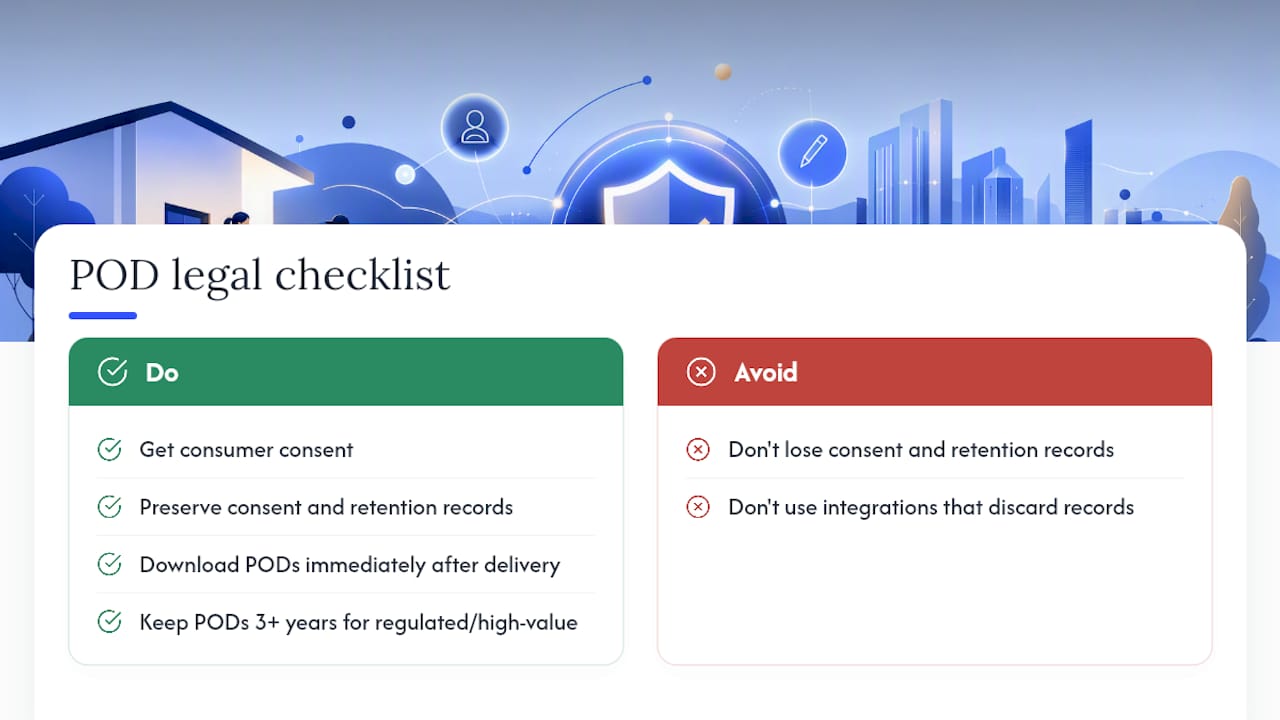
Download and store POD files as soon as they’re available. Carriers have retention windows, and waiting until you need a POD for a claim often means the record has aged out of easy retrieval. For legal documents and high-value shipments, storing PODs in a dedicated audit folder is standard practice. Law firms, for example, rely on this kind of verified receipt chain, which is why courier services for legal professionals treat POD as a non-negotiable part of the workflow.
Legal validity of electronic signatures
The E-SIGN Act gives electronic records and signatures legal validity for interstate commerce when a consumer has affirmatively consented and the notice and retention requirements are satisfied. The Uniform Electronic Transactions Act (UETA) provides the same framework at the state level. Together, they mean that a carrier-captured electronic signature on a driver’s mobile device carries real legal weight, provided the system meets consent and retention standards.
For shippers, this matters in two ways. First, a properly captured electronic POD is admissible evidence in a dispute or claim. Second, if your shipping system or carrier integration doesn’t preserve the consent and retention chain, that legal protection weakens. Build POD storage into your workflow from day one.
Pro Tip: Download POD records immediately after delivery confirmation and store them in a named folder tied to the order number. For regulated or high-value shipments, keep PODs for at least three years to cover standard claims and audit windows.
What fees and restrictions trigger a signature requirement?
Signature services are either chosen by the sender or applied automatically by the carrier. Knowing which triggers apply prevents billing surprises.
Common mandatory triggers:
- Age-restricted goods (alcohol, tobacco, firearms, certain prescription medications) require adult signature by carrier policy and often by law.
- High declared value: carriers may automatically apply direct signature above a set threshold. Check your carrier’s current rate guide for the exact value cutoff, as these thresholds are updated periodically.
- Certain controlled or regulated products where federal or state law requires verified receipt.
Fee context:
Signature service fees are listed in each carrier’s annual rate guide and on shipper invoices as line-item surcharges. Fees vary by carrier, service tier, and whether you’re a retail or account customer. The USPS Signature Confirmation service is a paid add-on with costs that depend on the mail class. FedEx and UPS list their signature surcharges in their published rate cards, which are updated annually. Always verify current fees directly in your carrier’s rate guide or account portal rather than relying on third-party summaries, which may lag behind rate changes.
How automatic application works:
If a carrier automatically applies a direct-signature requirement based on declared value, that surcharge appears on your invoice whether you selected it or not. If you believe a signature charge was applied in error, use a carrier invoice auditing tool to flag the discrepancy and file a service-failure claim. Shippers who audit invoices regularly recover these charges more consistently than those who don’t.
Practical safety tips for senders and recipients
For senders
- Match the signature tier to the actual risk level of the shipment. Overusing signature-required options raises delivery friction and cost without adding proportional protection.
- Communicate the signature requirement to your buyers at checkout and in the shipping confirmation email. A recipient who knows a signature is needed is far less likely to miss the delivery.
- Set signature defaults by SKU or order value in your order-management system so the right tier applies automatically.
- Audit carrier invoices monthly to catch misapplied signature charges or missed captures.
For recipients
- Use FedEx Delivery Manager, UPS My Choice, or USPS Informed Delivery to monitor incoming parcels and act before the first attempt if you know you won’t be home.
- Request hold-for-pickup proactively rather than waiting through multiple re-attempts.
- If the carrier allows neighbor authorization for indirect-signature shipments, arrange that before the delivery window.
- For adult-signature parcels, have a valid government-issued photo ID ready at the door.
Pro Tip: When shipping regulated or high-value goods, pair adult signature with restricted delivery and, where available, photo-ID verification. This combination gives you the strongest evidentiary position for claims and the clearest compliance record for regulated categories. You can read more about how delivery services are evolving to support these layered verification workflows.
Why Getitpicked prioritizes verified receipt for certain deliveries
Signature-required handling isn’t just a carrier feature. It reflects a deliberate choice about accountability. For legal documents, high-value items, and regulated goods, a delivery without a verified signature is a liability waiting to surface. The moment a parcel is left unsigned at a door, the chain of custody breaks, and proving what happened next becomes difficult for everyone involved.

Getitpicked’s operational approach treats proof of delivery as a core part of the service, not an optional add-on. For time-sensitive or sensitive deliveries, real-time tracking and documented receipt give both senders and recipients a clear, auditable record. That’s the standard that legal professionals, healthcare providers, and businesses with compliance obligations actually need. When the stakes are high enough to require a signature, the delivery service behind it should be built to match.
Getitpicked delivers with verified proof, every time
For individuals and businesses that need more than a “delivered” scan, Getitpicked offers same-day pickup and drop-off with real-time tracking and proof of delivery built into every order. No waiting through three re-attempts. No chasing a carrier facility across town.
Getitpicked is the fast, local alternative for verified delivery in Nova Scotia. Whether you’re sending legal documents, medical supplies, or high-value parcels, the app gives you live tracking and a documented receipt the moment your item is signed for. Businesses can access dedicated B2B logistics through the business delivery portal, and individuals can book a same-day pickup directly through the Getitpicked app. Book your first delivery today and get the verified receipt your shipment deserves.
Sources
Recommended